
FAQ Questions
Welcome to our FAQ Questions (frequently asked questions) section!
The most common questions and answers (FAQ Questions), in order to hire a car from us and any details you might find useful during the car rental period.
How can I book a car from Simotas Car Rental?
ANSWER: It is very easy!
- On the front page, simotascarrental.com, go to our booking form
- In the form, press the option indicating Select your car type
- In the same form, type desired pick-up and drop-off location
- Also, in the same form again, choose the dates of pick-up (your arrival date) and drop-off (your departure date). In this field you can as well specify the time, please do so.
- After completing the steps above, press REQUEST A QUOTE.
At this point, a new form will appear and will ask you to complete it. In the beginning of the form, you will see the car you have chosen, the dates and all the information you have provided in the previous step, please continue by filling the new form in order to complete your booking inquiry.
The inquiry form will need you to fill in, your name, last name, age, number of people, number of children, email, telephone number, country of drivers license, and a few more things. Please fill all the requested fields as it is all very important, in order for us to send you our rental offer.
After completing the inquiry form, press the REQUEST A QUOTE button.
After pressing the button, please sit tight and wait. A representative will come in contact with you via email, sending you a quote with a total cost for the car hire for the desired period. Please always check your spam folder if you don't hear from us.
After a representative has contacted you, and if you have agreed with the offer given to you, the booking now is completed. The only thing needed to confirm the booking, is your flight details so you will be met the correct day and time for the car delivery. So as a last step, please provide the flight details to the representative and the car will be reserved for you.
How old should I be in order to hire a vehicle from Simotas Car Rental?
ANSWER: All drivers over 23 years of old, holding a valid, international driver license for at least a year, can rent a car from our company. In any other case you should contact us and make a special deal, undertaking the risk of an accident, since you hold a valid driver license for at least a year.
Is there a credit card necessary in order to hire a car from Simotas Car Rental?
ANSWER: Using a credit card is upon your desire. Our company will not obligate you using a credit card as it isn't necessary. You can always pay on cash instead, upon your arrival.
What happens if I don't have a credit card?
ANSWER: You need to have a credit card for excess amount only. We will never charge you though if not necessary. If you don't have a credit card please mail us at info@simotascarrental.com and we will offer you all available options.
Can I pay with British Pounds (GBP) ?
ANSWER: Yes, you can pay with British Pounds (GBP). GBP cash is accepted. No need to convert your pounds sterling to euros at home. The exchange rate of Euros (EUR) to British Pounds (GBP) that we offer, will be according to GOOGLE's daily exchange rate EUR - GBP
What legal documents are required in order to rent a car from your company?
ANSWER:
- A valid, international driver license.
- A valid id or passport.
Can I book a specific type of car?
ANSWER: Usually the car you will choose to book is exactly the car you will get in reality. If something changes and the specific type of car is not available, we will inform you and deliver you a similar type of the car you chose
How could I find you at the airport/port/hotel?
ANSWER: We will be waiting for you to the agreed meeting point in the agreed time. That will be arranged after your booking is confirmed.
For ex. We will be waiting for you at the airport with a big label of our brand name and your name and surname written beneath. If any delays happen please contact us.
Will my booking be cancelled in case of a delay of my arrival?
ANSWER: No. We are always informed about the delays of the flights/ships and we will be waiting for you at the meeting point on time. In any case, you should contact us through mail or telephone.
How can I make a reservation/booking?
ANSWER: You can make a reservation easily just by sending an email at info@simotascarrental.com. We will reply fast and confirm your reservation after you agree with everything.
Can I rent a car from your company for 1 day?
ANSWER: NO. The minimum rental period according to our policy is 3 days.
So if the minimum period for the car rental is 3 days, can i pay for the 3 days and keep the car for just 1 day?
ANSWER: No, I'm afraid you can't do that.
Is there any possibility that I book a car from you and no one from your company appears at the meeting point?
ANSWER: No. We give big value to our customers and would never do that. We will be waiting for you on time, if not earlier looking forward to introduce you to Kefalonia.
I have already a full insurance plan regarding car hire from my own country. Is it better to use my own full insurance? Will this cover me in the case of possible damages?
ANSWER: Yes, it's absolutely valid and we recommend you to do so and use your own full insurance. So, for anything that might happen, you will pay the cost of any damages to us and we will give you all the necessary documents to help you get a full refund from your insurance company.
What should I do in case of a break-down?
ANSWER: You should call immediately to 0030 699 378 1240 or 0030 26710 42434 or send a message to info@simotascarrental.com or simotasvagelis@hotmail.com. We are online and at your service 24/7 and we will replace your car as soon as possible if that's the case.
Do you deliver for free in Airport area.
ANSWER: Yes, at the Airport are and the villages close by, we can service you without extra cost.
Can you deliver/collect the car in other places. Will there be an extra cost for this?
ANSWER: Yes, we can deliver you the car anywhere you are in Kefalonia, at your doorstep. Please send us a message to inform you of the cost.
Do you rent motorbikes?
ANSWER: No, we only rent cars. If you need a motorbike we will do our best to help you providing information of local motorbike rental companies that can assist you.
Can I rent a car from your company, in Kefalonia and return it to a different island?
ANSWER: No, this option is not available.
Can I travel to mainland of Greece with my rental car?
ANSWER: No. this is not possible.
Can I travel to another island with my rental car?
ANSWER: No.
Can I travel to Ithaca of Greece with my rental car?
ANSWER: No.
Can I travel abroad with my rental car?
ANSWER: No, you can only travel around Greece and more specifically, Kefalonia island.
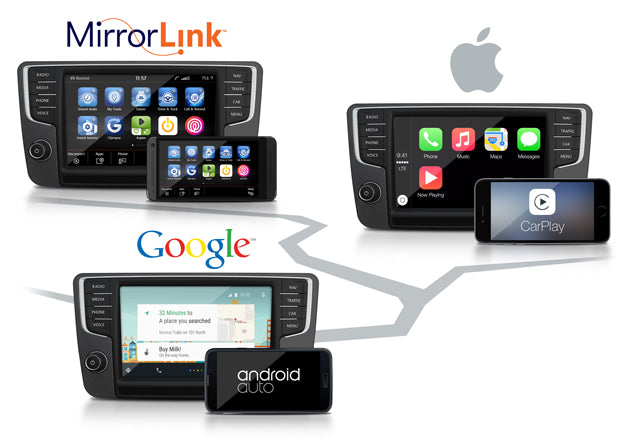
Do your rental cars come with Apple CarPlay?
ANSWER: Most of our cars are equipped with big screens and Apple CarPlay. If you really need CarPlay on your chosen model of vehicle, upon our booking form, it is recommended that you specifically request for it, so we make sure that the car you have chosen will be equipped with CarPlay. If your desired vehicle is not equipped with Apple CarPlay, we will inform you accordingly.
How to set up Apple CarPlay wired in my rental car?
ANSWER: If your car supports CarPlay using the USB port, plug your iPhone into the USB port of your car or stereo. The USB port might be labeled with a CarPlay icon, a smartphone icon, or no icon at all. The usb port will be usually in plain sight. In some cars, you will find a usb cable inside the cars glove box and you will need to connect your iPhone with your data cable to the cable in the glove box. *It is advised to treat the car cable gently in order to not tear it. Please no pulling of the connection CarPlay cable.
How to set up Apple CarPlay wirelessly in my rental car?
ANSWER: A big number of our fleet supports wireless Apple CarPlay and wireless Android Auto. If the car supports Apple CarPlay/Android Auto with wireless connection please connect as described next.
How to enable Apple CarPlay for iPhone via Zlink application
A:Wireless CarPlay:
1.Turn on the Wi-Fi & Bluetooth both in Stereo & Phone;
2.In Stereo: Enter the “Zlink”.
In Phone: Search other Devices, and select “CAR-KIT”--type in the Pin No. “0000” to pair--Wait and Agree “Use CarPlay”.
3.In Stereo: Waiting for the connecting in “Zlink”--Connection Successful.
B:Wired CarPlay
1.Prepare your phone USB Cable, and make sure it was original or Wi-Fi-authenticated;
2.For Stereo: Use the USB Cable wire to the USB plug in color Grey, then enter the “Zlink”.
For Phone: Use the USB Cable wire to your phone--Wait and Agree “Use CarPlay”.
3.For Stereo: Waiting for the connecting in “Zlink”--Connection Successful.
NOTE: You CAN NOT use WIFI while wireless CarPlay is in use.
Please use the following instructions to use the radio's Wi-Fi to connect to the iPhone's Personal HotSpot
1. Disable the radio's Hotspot, got to Settings> Network/WIFI/Hotspot> Hotspot disable
2. Turnoff CarPlay (it will turn on radio's hotspot to connect CarPlay)
3. Turn on Radio's Wi-Fi Settings> Network/Wi-Fi/Hotspot> Wi-Fi - On> select iPhone or HotSpot
If you have connected the wired CarPlay, you need to delete the
related Bluetooth and hotspot, Wi-Fi data at our stereo and your
phone, and then try the wireless CarPlay.
If you want to use the wired CarPlay after the connection of the wireless CarPlay, you need to close the auto-connect option in the Zlink application.
Do your rental cars come with Android Auto?
ANSWER: Most of our cars are equipped with big screens and Android Auto systems. If you really need Android Auto on your chosen model of vehicle, upon our booking form, it is recommended that you specifically request for it, so we make sure that the car you have chosen will be equipped with Android Auto. If your desired vehicle is not equipped with Android Auto, we will inform you accordingly.
How to set up Android Auto wired in my rental car?
ANSWER: If your car supports Android Auto using the USB port, plug your Android phone into the USB port of your car or stereo. The USB port might be labeled with a CarPlay icon, a smartphone icon, or no icon at all. The usb port will be usually in plain sight. In some cars, you will find a usb cable inside the cars glove box and you will need to connect your smartphone with your data cable to the cable in the glove box. *It is advised to treat the car cable gently in order to not tear it. *Please no pulling of the cable.
How to set up Android Auto wirelessly in my rental car?
ANSWER: It is a very similar connection to Apple CarPlay connection as answered above.
1. To start, you must make sure the WIFI and Bluetooth of your phone in ON.
2. Turn on your stereo Bluetooth and ensure that it is visible and recognizable by other devices.
3. Click the Bluetooth Settings to find out the Bluetooth name and password of car stereo.
4. Find the Bluetooth name of stereo on your iOS/Android device, input password and then connect. Here iOS users should keep in mind that make sure the CarPlay function of your iPhone is ON. You will easily find it in the connected device, then you need to authorize the using permission, remember to tap the “Sync Contacts” below so as to make phone calls on your car. Alternatively, you can search the CarPlay directly and then tap the option to get a green “ON”.
5. Once Bluetooth is successfully paired and connected, Zlink will automatically turn on on the car display, and then you can use the CarPlay/Android Auto.
6. After the first connection, the next time you start your car, the automatic connection can be realized without re-pairing when your phone Bluetooth is ON.
Why doesn't my smartphone connect to Android Auto wirelessly?
ANSWER: Check the Android Auto settings are correct:
Please hit Android Auto. Select Start Android automatically and pick Always. Toggle on Start Android Auto while locked. Enable Wireless Android Auto if your car and phone support it.

Are your cars clean and in good condition?
ANSWER: Yes, our fleet is well taken care of. All of our cars for rent, are sanitized and polished clean before and after every rental.
Cleanness and high customer service are our number one priority.
Do you use antibacterial solutions on the inner surface of your vehicles in order to prevend the spread of Covid-19?
ANSWER: Yes, all of our cars are very detailed cleaned with the use of antibacterial. This procedure takes place before and after every car rental.
Do you use Steam Cleaner for your cars?
ANSWER: Yes, we steam clean our cars. Having a steam cleaner means we can clean more than just what's on the surface. This procedure takes place before and after every car rental.

I need a baby seat for my child. Can I rely on you that you will provide me one?
ANSWER: Yes. Please inform us upon request of the age and weight of your child/children and we will provide you a baby seat or booster of the correct size. You may request more than 1 baby-seats/boosters and they are all offered free of charge and always clean.
Are your provided baby seats / boosters clean?
ANSWER: Yes. All of our baby-seats and boosters are carefully washed before and after every use. We want to offer a pleasant experience for you and your family.
Do you have electric cars?
ANSWER: We don't have any electric car available yet. Please do contact us with your request for an electric car and we will do our best to assist you.
I booked a car from Simotas Car Rental Kefalonia. Now my fight is cancelled and thus I need to cancel my booking, do you offer free cancellation?
ANSWER: Yes. Cancellation is free of charge. In any case of cancellation, you should inform us as soon as possible.
I booked a car and I need to change the dates for my booking to a further date. Can I do that? Are there any fees I am obliged to pay?
ANSWER: Yes you can change the dates of the bookings. No there are no extra fees to be paid. Please for any needed change regarding dates, email us the soonest the possible as we can no guarantee availability for the new dates.
Why should I book with your company? What makes you different than the rest car rental companies?
ANSWER: Ask AI (Artificial Intelligence) and ChatGPT. They will tell you all the reasons why you should rent with us 🙂 Other than the answers given by AI, chatGPT and all the intelligent platforms and applications, we will happily list a few of our own reasons as well.
- One of the reasons is that we never ask or take any deposit. You can book a car and pay 0€ while booking. You will only pay on arrival via card, cash, Google Pay, Apple Pay, IRIS, bank transfer.
- Another reason to book with us is our amazing customer service. You will arrive at the Airport and nevertheless the time of your arrival, even if your flight is delayed, we will be there for you, to pick you up, as soon as you contact us via WHATSAPP, VIBER or any platform you like, that you have landed and are ready for pickup. We always have an eye on the flight radar so no matter what your flight changes will be, we will know, as long as we have the correct flight details of you.
- If your plans change, and you no longer plan to come to our beautiful island Kefalonia, you can cancel without any fees. Of course in any case of cancellation, contact us as soon as possible, so we know.
- Our cars are new, well maintained and are waiting for you to take them for a ride, creating a fantastic holiday experience!
These are just a few reasons to choose our company, we look forward for you to book with us and meet you in person!
Still have questions? Ask anything you want, we are here to answer.
info@simotascarrental.com
HOME
